
Tropical Leaf Perforated Aluminum Screens for Facades
Turn tropical leaf artwork into a laser-cut facade panel concept. See a real HoleSnap layout, hole settings, open area, and a practical fabrication-quote checklist.
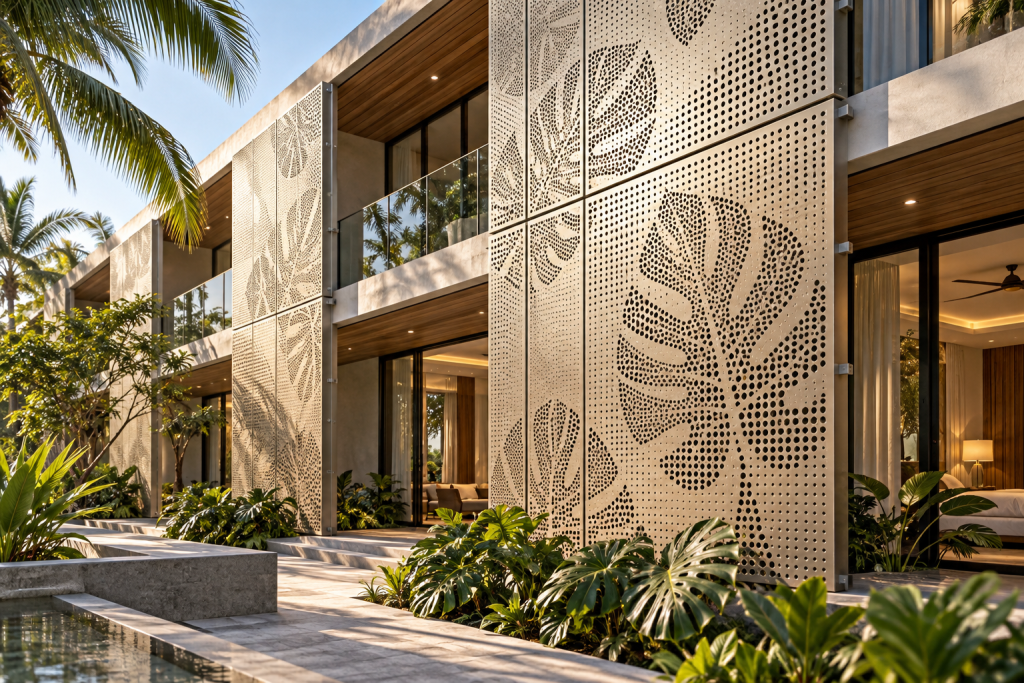
A tropical leaf motif can give perforated aluminum facade panels a distinctive look at a hotel entrance, restaurant terrace, or commercial courtyard. This example is a 900 × 600 mm non-loadbearing infill screen for a resort courtyard entrance, attached to a separate support frame. It is an illustrative quote-stage case built from original concept artwork—not a customer installation or tested product.
HoleSnap Image to Perf lets designers test the image-to-perforation step in the browser. The live preview helps turn a visual direction into a specific conversation with an architect, client, or metal fabricator; it is not a production-certified drawing.
Featured concept visualization: a design illustration, not a photograph of a completed installation.
Where the design can be used
- Hotel or resort entrance: carry a botanical identity across a feature screen or canopy fascia.
- Restaurant terrace or balcony: define an outdoor edge or screen a service area; privacy and shade depend on the final installation.
- Retail courtyard or walkway: repeat the motif across modular panels around an entry or equipment enclosure.
These are design applications, not performance claims. A preview does not establish solar control, ventilation, structural capacity, or code compliance.
Four steps from artwork to a fabrication quote
1. Simplify the source and define one panel
Use a high-contrast leaf silhouette rather than a detailed photo. Broad lobes and a few clear vein gaps survive perforation better than thin, tangled lines. This example uses a 900 × 600 mm canvas—one panel module, not a full facade. Keep mounting holes, folds, and solid edge bands in mind from the start.
2. Set quote-stage hole geometry
The real editor preview uses staggered circular holes, 12 mm pitch, and a 2.5–7.5 mm diameter range. The material candidate for a supplier quote is 2.03 mm 5052-H32 aluminum. SendCutSend lists that thickness and publishes a minimum cut-hole guideline equal to material thickness, so this example’s 2.5 mm minimum exceeds that supplier-specific reference. HoleSnap estimates a 4.5 mm clear web at the maximum diameter. Xometry’s general sheet-cutting guide gives a minimum hole-to-hole distance of the smaller of 6× material thickness or 0.125 in; for 2.03 mm sheet, that benchmark is 3.175 mm. These are preliminary DFM checks, not approval of this part; the selected laser shop’s limits and final geometry govern.
These values are starting points only. Machine capability, alloy, kerf, finish, edges, and the chosen shop’s design rules can change the limits. Have the selected fabricator approve the actual file and material.
3. Map the image and inspect the result
For this graphic, Invert Brightness is on and Ignore Background is 12%, making the dark foliage the stronger perforated shape while the white background stays clear. The preview reports 1,835 holes and 14.6% estimated open area. Those values describe this image and setup; they do not guarantee airflow or shading performance.
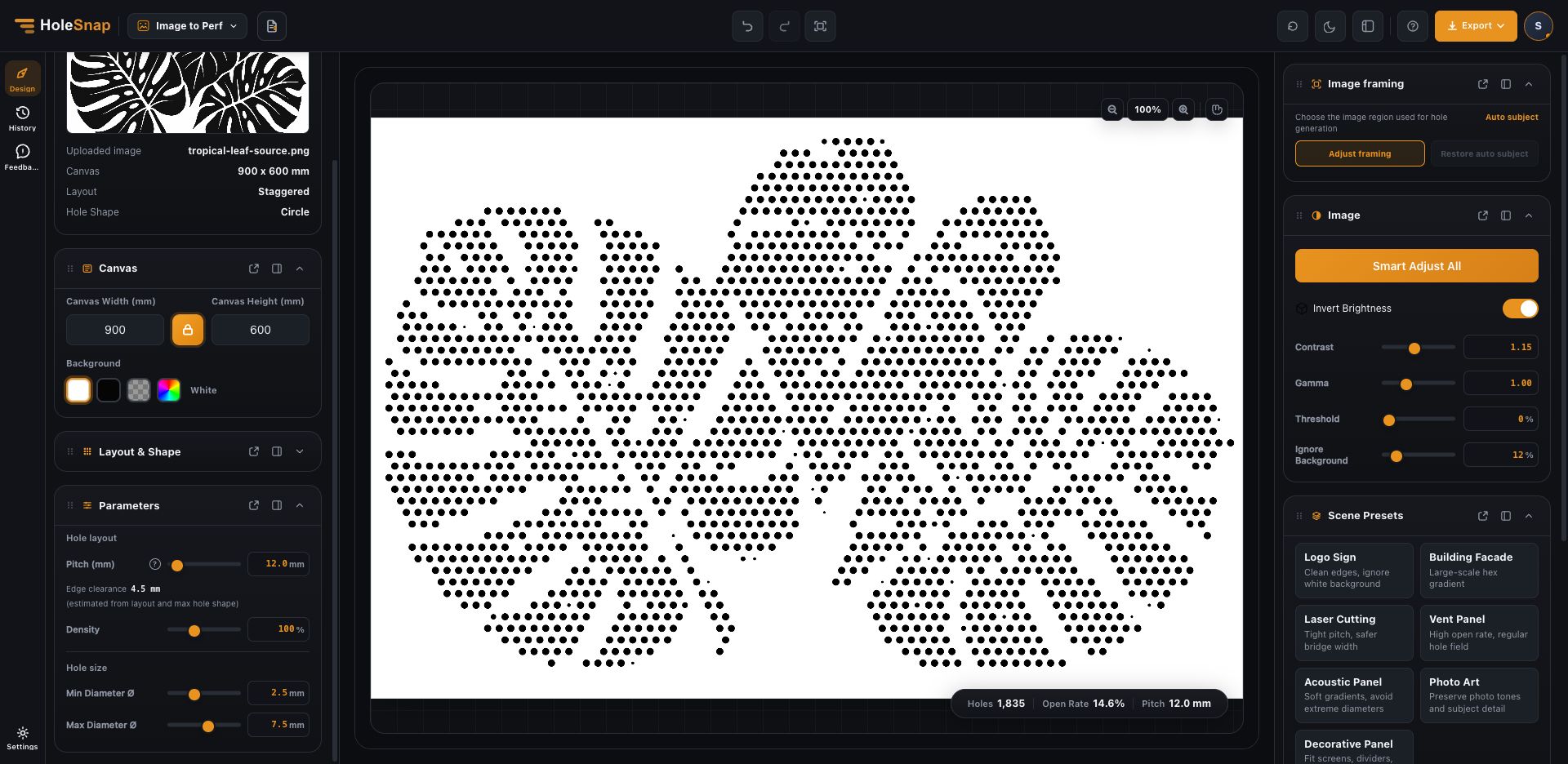
Actual editor screenshot: 900 × 600 mm canvas, staggered circular holes, 12 mm pitch, 2.5–7.5 mm diameter range, and 4.5 mm estimated clear web.
4. Add the details the preview cannot approve
Review the motif at full-panel and close-up scale. Before release, add a continuous unperforated perimeter sized with the fabricator, then place fasteners and folded-edge clearances in CAD/CAM. The current editor preview does not model that border or the mounting system; white space in the source image is not a verified fixing allowance. For a quote, send the panel size, alloy and thickness, pitch, hole range, finish, and mounting concept. Ask the shop to confirm stock size, edge distances, tolerances, flatness, and fixing details. An engineer must separately review the support frame, wind loads, and applicable code requirements.
Turn a visual direction into a useful brief
Image-to-perforation software helps compare a botanical facade concept before detailed CAD. Try your own artwork in HoleSnap Image to Perf, then ask the fabricator to validate the geometry for the exact material and process.
For a repeatable decorative-panel workflow, see the HoleSnap Pattern guide.
Fabrication references
- SendCutSend: 5052 H32 Aluminum — available thicknesses and material-specific design guidance.
- Xometry: Sheet Cutting Design Tips — general feature-spacing guidance; the selected supplier’s specifications take precedence.