
COMMUNITY

HoleSnap Community

Ask questions, share projects, and trade ideas with makers.

Start a discussion

Image to Perf: Clearer Previews, More Control

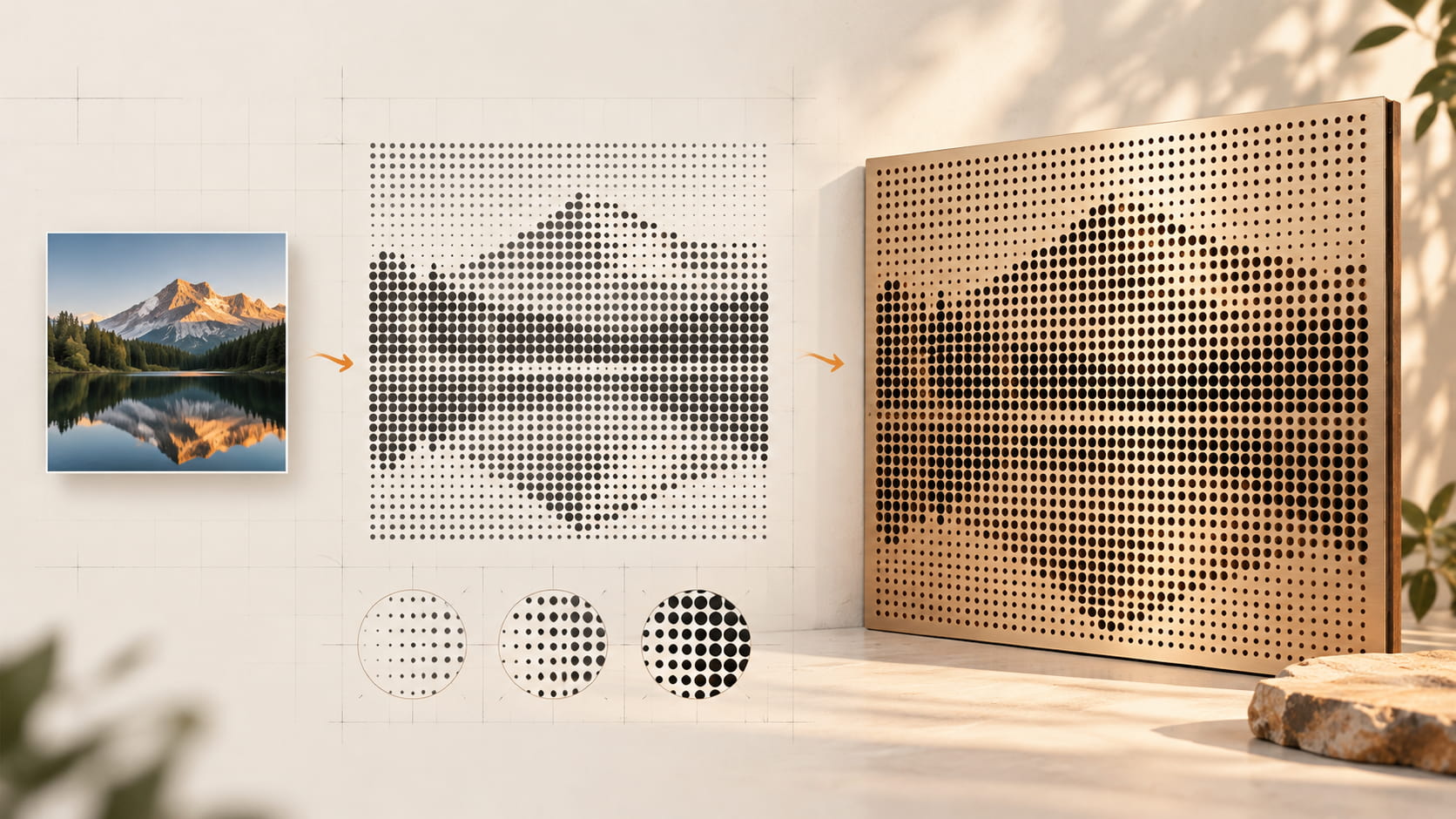
Image to Perf turns a landscape image into a tonal perforation map and a perforated panel.


We’ve been refining the Image to Perf workflow to make image adjustments easier to understand and results easier to review.


What’s new

  • Clearer geometry feedback: See layout spacing estimates separately from actual overlap checks. An estimated small gap does not necessarily mean holes overlap.
  • More predictable image framing: New uploads keep the full image by default. Cropping and other framing changes only take effect when you apply them.
  • Three preview modes: Switch between the original image, tonal mapping, and the perforated result. Previewing does not change the generated layout or export.
  • Independent brightness adjustment: Adjust source brightness from −50 to +50. The default value, 0, preserves the neutral setting.
  • Repeatable Smart Adjust: Explore recommended settings for the current image. Smart Adjust may increase Pitch to keep candidate calculations within the generator’s budget; it does not change the canvas size or set an export limit.
  • A more informative export summary: Review canvas dimensions, hole count, spacing estimates, overlap-check status, and format notes before exporting. Existing export permissions, quotas, and format rules are unchanged.

A few important details

Background ignore uses a rule estimated from the image corners. It is not AI background removal. Image framing suggestions are optional, and changes remain a draft until you apply them.

This preview does not add AI cutout, automatic background removal, automatic subject cropping, or new export formats.

We’re continuing to refine the workflow. If you try the development preview, let us know which parts feel clearer and where you still get stuck.

Replies

0

No replies yet. Start the conversation.

Inicio › Foros › Announcements › Image to Perf: Clearer Previews, More Control

  • Este debate está vacío.
Viendo 1 entrada (de un total de 1)
  • Autor
    Entradas
  • #2605
    yangxi
    Superadministrador

    Image to Perf turns a landscape image into a tonal perforation map and a perforated panel.


    We’ve been refining the Image to Perf workflow to make image adjustments easier to understand and results easier to review.


    What’s new

    • Clearer geometry feedback: See layout spacing estimates separately from actual overlap checks. An estimated small gap does not necessarily mean holes overlap.
    • More predictable image framing: New uploads keep the full image by default. Cropping and other framing changes only take effect when you apply them.
    • Three preview modes: Switch between the original image, tonal mapping, and the perforated result. Previewing does not change the generated layout or export.
    • Independent brightness adjustment: Adjust source brightness from −50 to +50. The default value, 0, preserves the neutral setting.
    • Repeatable Smart Adjust: Explore recommended settings for the current image. Smart Adjust may increase Pitch to keep candidate calculations within the generator’s budget; it does not change the canvas size or set an export limit.
    • A more informative export summary: Review canvas dimensions, hole count, spacing estimates, overlap-check status, and format notes before exporting. Existing export permissions, quotas, and format rules are unchanged.

    A few important details

    Background ignore uses a rule estimated from the image corners. It is not AI background removal. Image framing suggestions are optional, and changes remain a draft until you apply them.

    This preview does not add AI cutout, automatic background removal, automatic subject cropping, or new export formats.

    We’re continuing to refine the workflow. If you try the development preview, let us know which parts feel clearer and where you still get stuck.

Viendo 1 entrada (de un total de 1)